EverStamp
Home › Photo request

Someone is asking you for photos

An organisation asks you to take photos with EverStamp: of damage, a meter reading, a home or a vehicle. On your phone the photos get a signature and a timestamp, so that it can later be checked when they were recorded and that they have not changed since. You do not make an account, and it costs you nothing.

iPhone with iOS 18 or later · Android 12 or later

Download on the App Store

For Android, EverStamp is coming soon to Google Play.
In three steps

How it works

1

Install EverStamp and open the link

From the App Store on an iPhone; for Android, EverStamp is coming soon to Google Play. Then open the link from the email or message on your phone: it opens in the app. If it does not, type the code that came with the link under “Take a request”.

2

See who is asking and enter your name

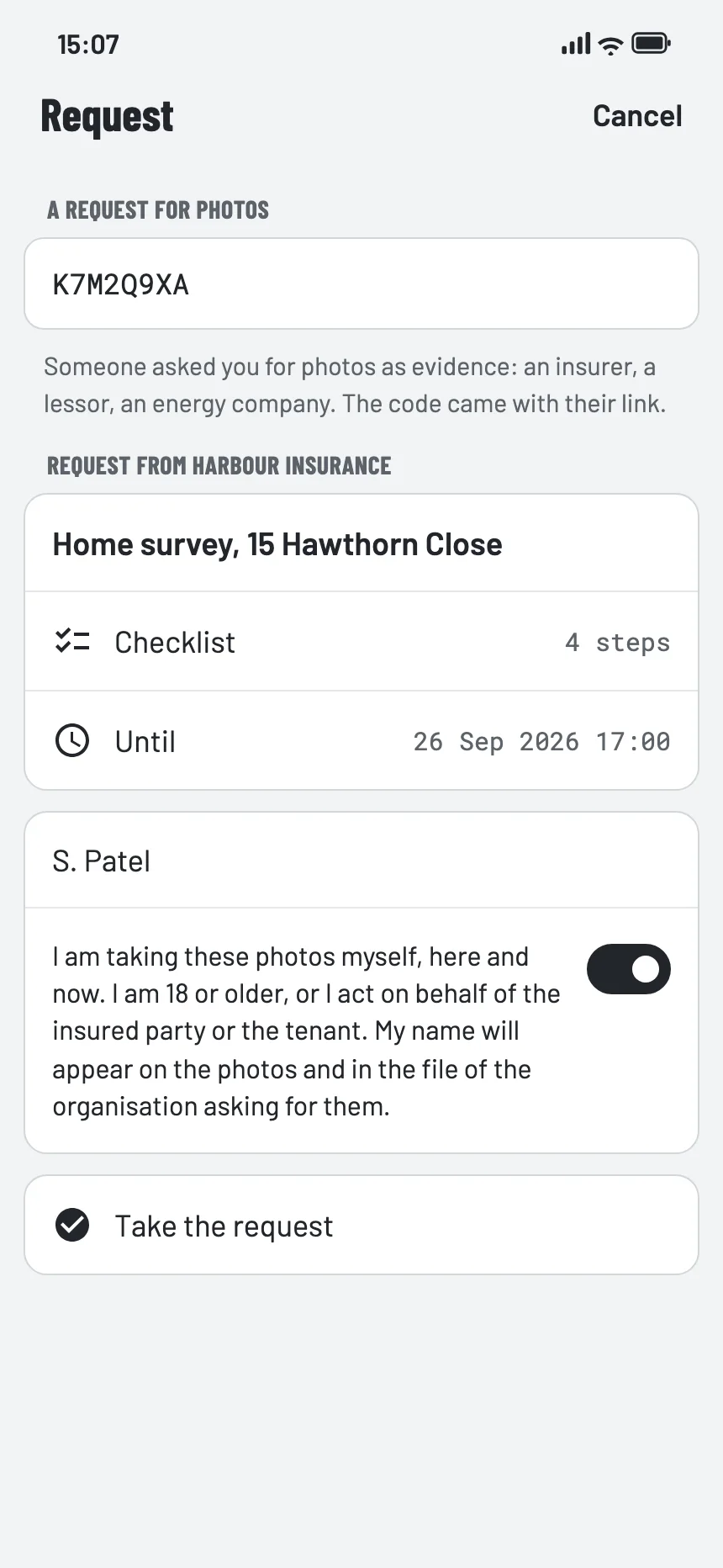
The app shows which organisation is asking, what for, and until when. Enter your name and confirm that you take the photos yourself, here and now.

3

Take the photos along the checklist

The checklist says which photos are needed. Done is done: the organisation gets the file, and you get a link as your receipt.

The request in the EverStamp app: which organisation is asking, what for, until when, and the button to take the request
Your photos

What happens to your photos

  • They go, encrypted, to the organisation that asks for them. EverStamp keeps that archive and its key for that organisation. Through the dashboard or the API only an owner or administrator of that organisation, or an API key of that organisation, can open it, and every opening is written in its audit log. Technically EverStamp can open it too, because it manages the key; EverStamp does that only at the organisation’s written request, or when a court or authority orders or demands it under the law.
  • Each photo carries the date and time, and the place if you allow it. Your name is stated with the photos and in the organisation’s file.
  • The registry notes that the file exists, as a fingerprint: numbers from which no image can be rebuilt. Whoever receives the file checks it at everstamp.app/verify.
  • You make no account. Your phone belongs to the organisation temporarily, for exactly this one request. The phone number or email address the organisation entered to send you the link is deleted 30 days after the request is completed.

This is what you confirm in the app:

“I am taking these photos myself, here and now. I am 18 or older, or I act on behalf of the insured party or the tenant. My name will appear on the photos and in the file of the organisation asking for them.”

More in the privacy statement →

Questions

What if…

The page says the request has expired or was already answered

Then no more photos can be added. If that is unexpected, ask the organisation for a new link. A request works for as long as the organisation chooses, at most 30 days.

I have no iPhone or Android phone

Ask the organisation that sent the link for another way. EverStamp runs on an iPhone with iOS 18 or later and on Android 12 or later.

What your phone needs →

Does it cost me anything?

No. You make no account and take out no subscription; the organisation pays for the request.

Can I see the photos again later?

Through the link you get as your receipt, for seven days. After that the organisation has the file; ask them.

For the organisation

Send this explanation along

Put this paragraph in your own email or letter, next to the link or the QR code from the dashboard. The request itself you prepare under Requests in the dashboard.

We ask you to take photos with the EverStamp app. Install EverStamp on your iPhone from the App Store, then open our link: the app shows who is asking and which photos are needed. If you have an Android phone, let us know: the app is coming there soon. You do not make an account, and it costs you nothing. What exactly happens is explained at everstamp.app/photo-request.