EverStamp
Home › Business › Car rental
Car rental and leasing

Every handout and return on record, for you and your renter

Two minutes per car: the plate, the mileage and every side, with a timestamp anyone can check. So how the car looked is already on record when it comes back, and the conversation is about the car rather than about the photos.

Hiring a car yourself? What to photograph at pickup and return →

A car key passed from one hand to another
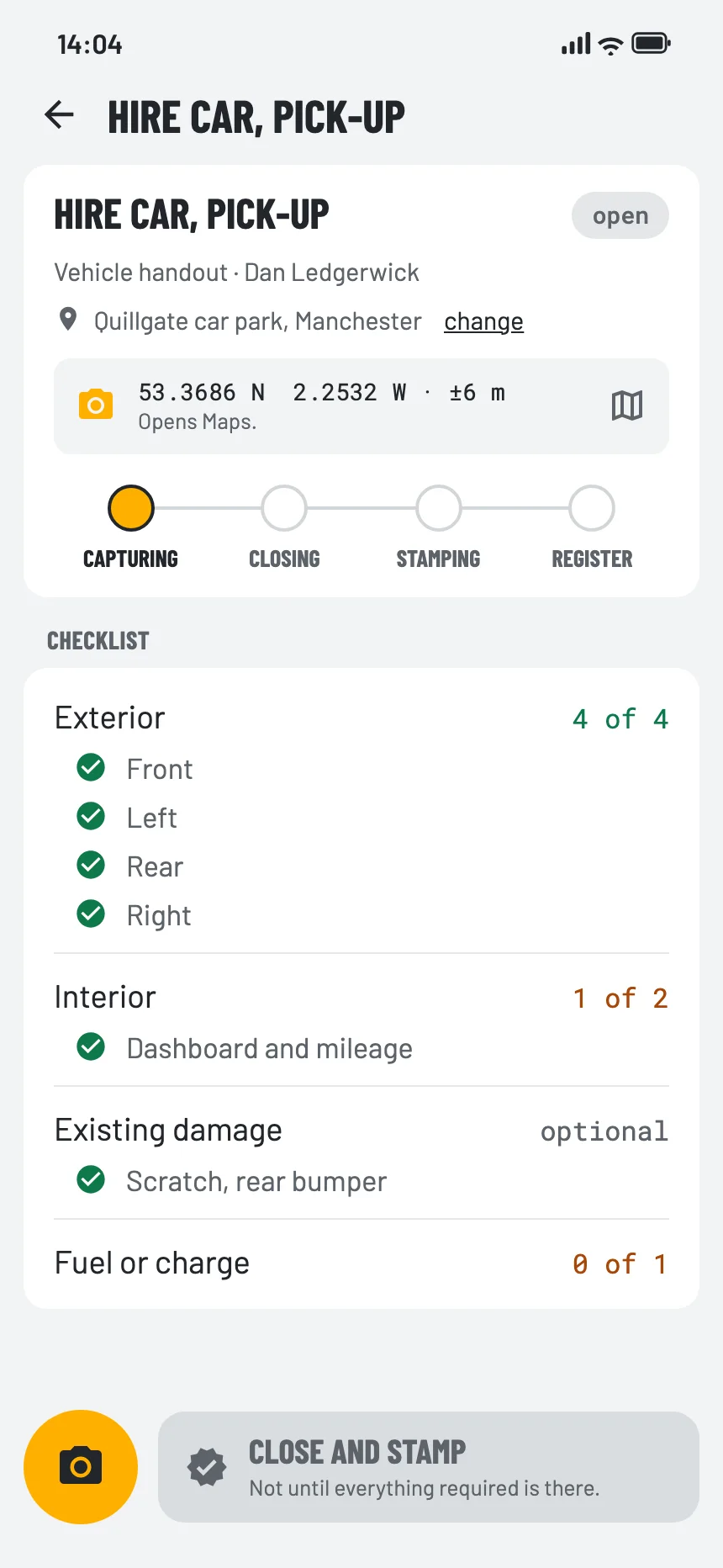
The checklist for this sector in the EverStamp app
What it costs you today

Sound familiar?

‘That scratch was already there.’

‘I have photos on my phone, but when were they taken?’

‘The customer came after hours, so nobody saw the car.’

How the photos reach you

At the desk, or after hours

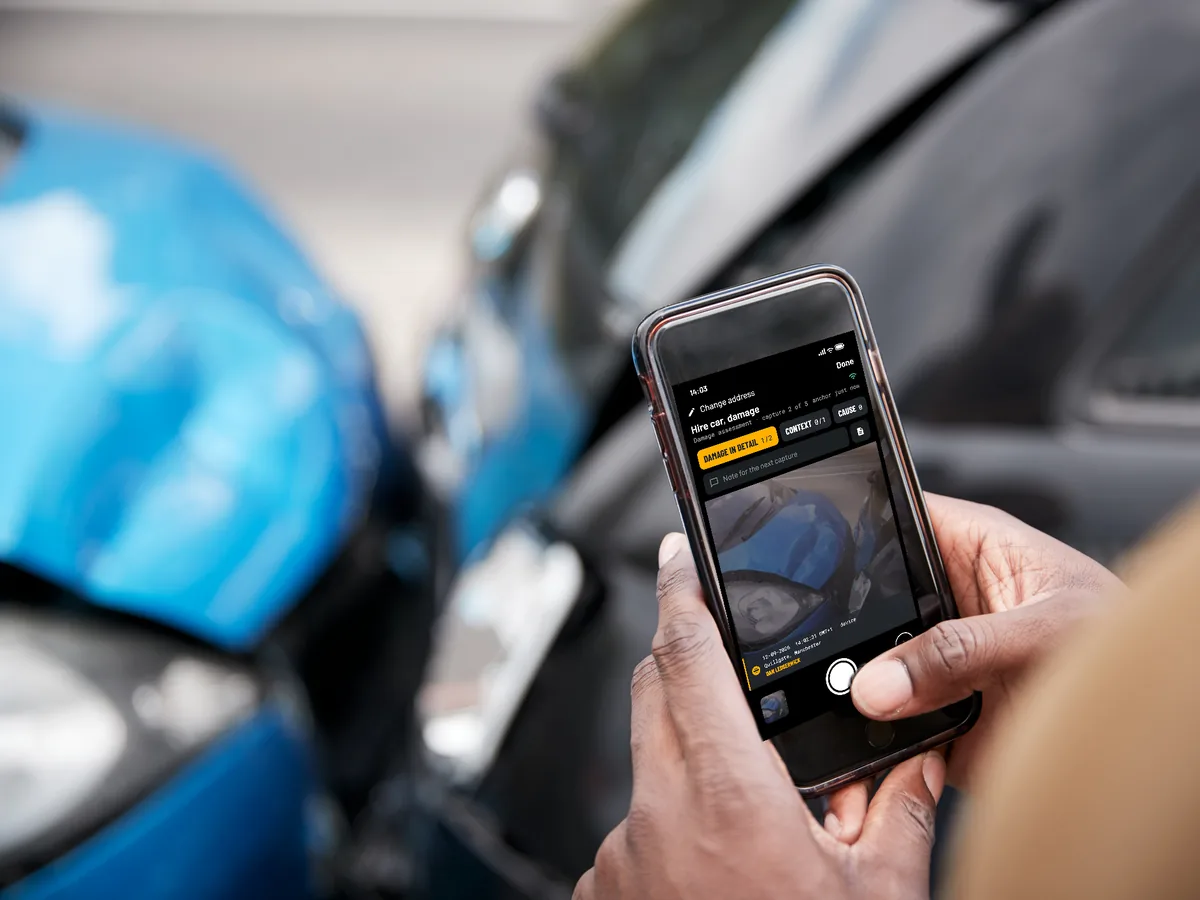
Whoever holds the phone, the file is the same. The EverStamp app signs every photo at the moment of capture, with a key that sits in the phone’s secure hardware and never leaves it, and when the phone registers, Apple or Google confirms that it is the genuine app on a real phone.

Two hands hold a phone with the EverStamp camera open by a blue car with a damaged front
Your customer, through a link

After hours: the renter takes the photos

Key box or contactless pickup? You send the renter a link with your checklist. They photograph the car in the EverStamp app, without an account and at no cost, and the file reaches you automatically. After the delivery the renter automatically gets a link as a receipt, valid for a week.

Your own people

At the desk: your staff

With the Vehicle handout or Vehicle intake template your staff walk round the car in two minutes, on iPhone or Android, even without signal in the car park. Switch on ‘The customer signs at the end’ in your own version of the checklist and the renter signs on the phone.

A contractor you appoint

Whoever delivers or collects the car

A transporter or repairer records the vehicle with the same template, and the file lands in the same place.

What gets photographed

Plate, mileage and every side

Vehicle intake asks for the plate and the mileage as fields, and the four sides of the car. At that step the app reads along on the phone itself and proposes both values, and your staff confirm with a tap. No image is sent to us for recognition. Vehicle handout records the four sides, the interior with a photo of the mileage, existing damage and the fuel or charge; if you want the plate and the mileage as fields there too, add them to your own version of the checklist.

A required step has to be there before the file closes, so a forgotten rear side shows up while the car is still there. In the dashboard you make your own version, for example with a step for the charging cable or the roof rack.

Licence plateat least 1
  • The plate, with the field alongsidefield
Odometerat least 1
  • The mileage on the odometerfield
Exteriorat least 4
  • Front
  • Left side
  • Rear
  • Right side
Interiorat least 1
  • Dashboard, seats and boot
Damageoptional
  • Every scratch, dent or chip up close
The moment itself, step by step
At your end

Your rentals together

Handout and return are two files, each with its own seal. You keep them together in a project, or make the return a follow-up file on the same phone.

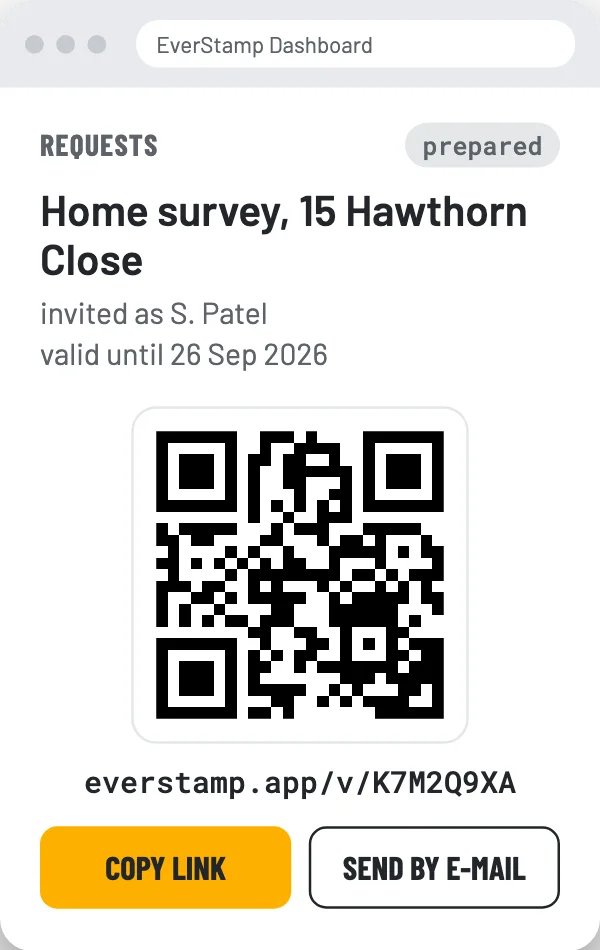
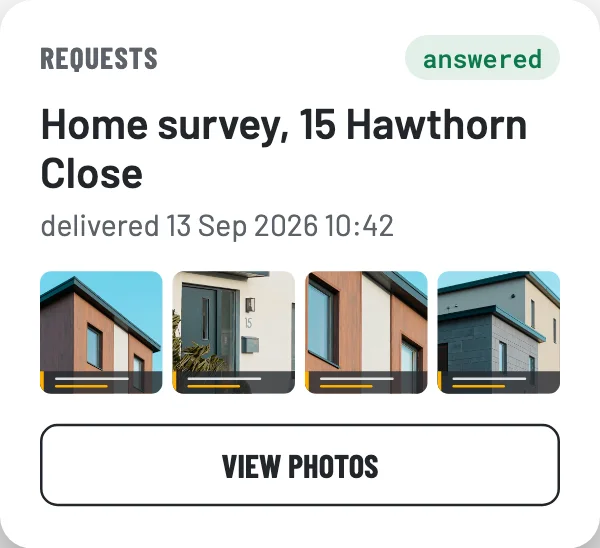
A request per rentalA link or a QR code with your checklist. What the renter records reaches you automatically.
Search by plateThe dashboard searches the fields, so you find every return for a plate, and the handout too if your own version has a plate field.
Alongside your rental softwareEverStamp works separately from it. If you want to connect, a webhook reports a new file and the API delivers it, with its seal.
The condition report for the renterA PDF condition report or a share link, with a QR code the renter uses to check it for themselves.
A prepared request in the dashboard, with its QR code and linkThe answered request in the dashboard, with the delivered photos
Before you rely on it

What a file establishes, and what it leaves to you

The file establishes
  • That these photos existed in this form at the time of the timestamp
  • That they were taken with the EverStamp app, on the device named in the file
  • That anything added, removed or changed since then shows up
It leaves to you
  • How bad the damage is, or what a repair costs
  • Whether a scratch is new: you compare that yourself, with the photos from the handout
  • That everything was photographed: the checklist shows what is missing
Questions

What businesses ask

What is such a file worth legally?

The timestamp is qualified under the EU eIDAS regulation. In the EU, Article 41 presumes the date and time, and the integrity of the data bound to them, to be accurate; in the United Kingdom the same rule applies through assimilated law. What the photos show is for the court to weigh.

What does the renter have to do?

Install the EverStamp app from the App Store and open your link; for Android the app is coming soon to Google Play. No account is needed and it costs nothing. After the delivery the renter automatically gets a link as a receipt, valid for a week.

How do I know the renter used the genuine app?

When the phone registers, Apple or Google confirms that it is the unmodified EverStamp app on a real phone, and every photo is signed with a key that exists only in that phone. Anything changed in a photo afterwards shows up in the check.

Does it work alongside our rental software?

Yes. EverStamp works separately from it, so you change nothing to start. If you want to connect later, there are webhooks and the API.

Are handout and return linked?

You keep them together in a project. If you record the return on the same phone as the handout, you can make it a follow-up file: its first photo then points to the first file, and the verification page shows it as a continuation of the earlier file. Which car it was is recorded at the return as the plate that was entered.

What if we stop?

You export everything from the dashboard, and after the subscription ends you have thirty days to do so. After that the files are deleted. A copy you already gave the renter, the archive or the PDF report, stays verifiable on the verification page, because its entry in the public log stays. A share link no longer works by then.

What does it cost?

Business starts at €49 a month, excluding VAT, and you can try it free for 14 days first, with 20 files and without payment details. The bundles differ only in volume; which one fits and what it costs, you see in the dashboard when you subscribe. Enterprise, with delivery into your own system, is priced on request.

Try it at one branch

Try Business free for 14 days, with 20 files and without payment details. Set up your own checklist and run your first rentals through it.

See the Business and Enterprise plans Talk to us

Other sectors