EverStamp
Home › Pricing

The same prices in the app and on the site

Free gives you the same file and the same seal as Plus, one a month instead of five. Everything a recipient needs to check that file is in every plan, the free one included. A seal that only the paying half can check is not worth much.

Basis

€0
always free

To try it, or for the odd moment.

  • One file a month
  • Date, time and place in the image
  • Checklists with fields, such as a meter reading
  • Works without a signal
  • A qualified timestamp when you close the file
  • PDF report and the full archive
  • The recipient checks it without an account
Get started
For regular use

Plus

€7.50
a month incl. VAT, billed €89.99 a year

When it comes up more than once in a while.

Everything in Basis, plus:
  • Five files a month, five more for €4.99
  • Customer signature at key handover
  • Your logo on the report, backup to your own cloud
  • Share links with a password, up to 90 days
Get started
For organisations

Business

From €49
a month excl. VAT · less when paid yearly
You choose the bundle, and see its price, in the dashboard.

For tradespeople and companies with people on the road.

Everything in Plus, plus:
  • The dashboard: orders, projects and checklists
  • Requests: customers photograph from your link
  • Your own templates, with your own fields
  • Webhooks and an API
Try free for 14 days

Enterprise

On request
priced to your volume

For insurers, lenders and others who receive files at scale.

Everything in Business, plus:
  • Delivery into your own system
  • A qualified timestamp per photo included, by agreement
  • Volume, retention and archiving by agreement
  • A signed data processing agreement, a named contact and a service level
Request a quote

Try Business free for 14 days, with 20 files. Create your organisation with the button above; no payment details are needed, and you choose the bundle in the dashboard. During the trial you invite your people, link their phones with a linking code and send orders with your own checklists. After 14 days or 20 files, whichever comes first, the trial ends. You then have thirty days to take a bundle, and everything stays; until you pay, you cannot link new phones or send new orders. Phones already linked keep recording until the end of those thirty days. If you take no bundle, the agreement ends and we delete your organisation’s data after those thirty days; export what you want to keep in that time. A copy you already gave to someone, the archive or the PDF report, stays verifiable on the verification page, because its entry in the public log stays. A share link no longer works by then. Requests from customers and Business share links come with the paid plan.

Files you buy on Plus do not expire, not even after your subscription ends. Each month the five from your subscription go first, and only then the ones you bought, one at a time. Your credit belongs to your subscription. After Plus ends, you use it on the phones that were already linked.

Storage comes with Business. An owner or administrator switches it on, after which every file a member records is kept with us, encrypted. Files stay for as long as the subscription runs, at no extra cost; you can set a shorter term yourself. When the subscription ends you have thirty days to collect everything: in the dashboard, through the API or in one go. After that we delete the files.

The Business bundles. The bundles differ only in volume, not in tooling: every bundle has the dashboard, templates, requests, search, webhooks, the API, export and your own styling of the stamp bar. Which bundle fits and what it costs, you see in the dashboard when you subscribe. Enterprise is priced on request: request a quote.

Business and Enterprise prices exclude VAT. Plus is paid in the app, at the price the App Store or Google Play shows, VAT included. The amounts above apply in the euro countries; outside them the store converts. The terms of use apply to every plan.

Bundles have a soft cap: if your company goes over, the work carries on and we settle it afterwards at the extra-file price of your own bundle. At 80 and at 100 per cent of the bundle you get a notice, with a button to move up. An answered request counts as one file; sending a request costs nothing. We do not refuse a file because a counter is full, and there is nothing to buy in advance. Annual bundles cost less, and the files are pooled across the year.
Business

The dashboard: set up the work, get it back sealed

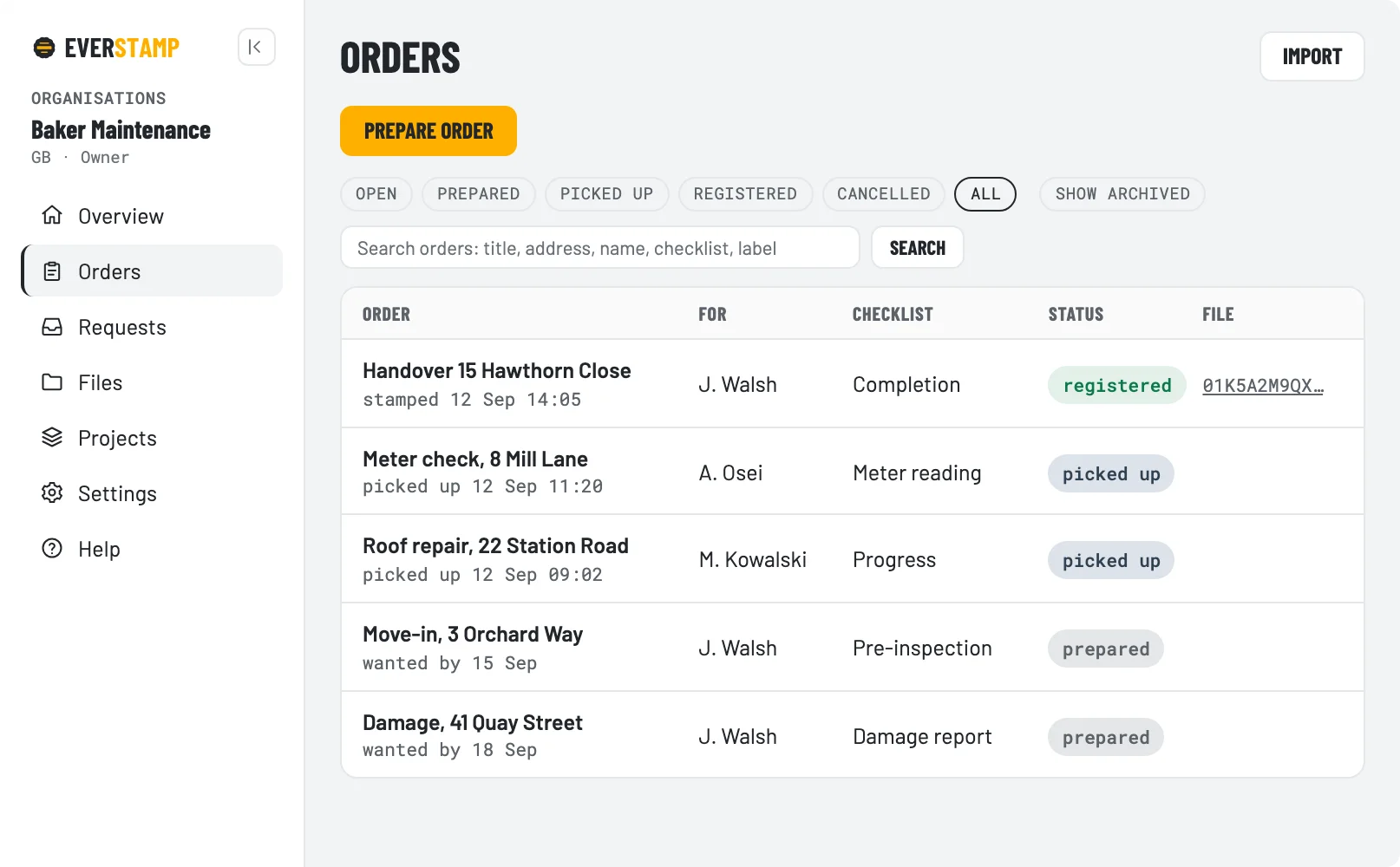
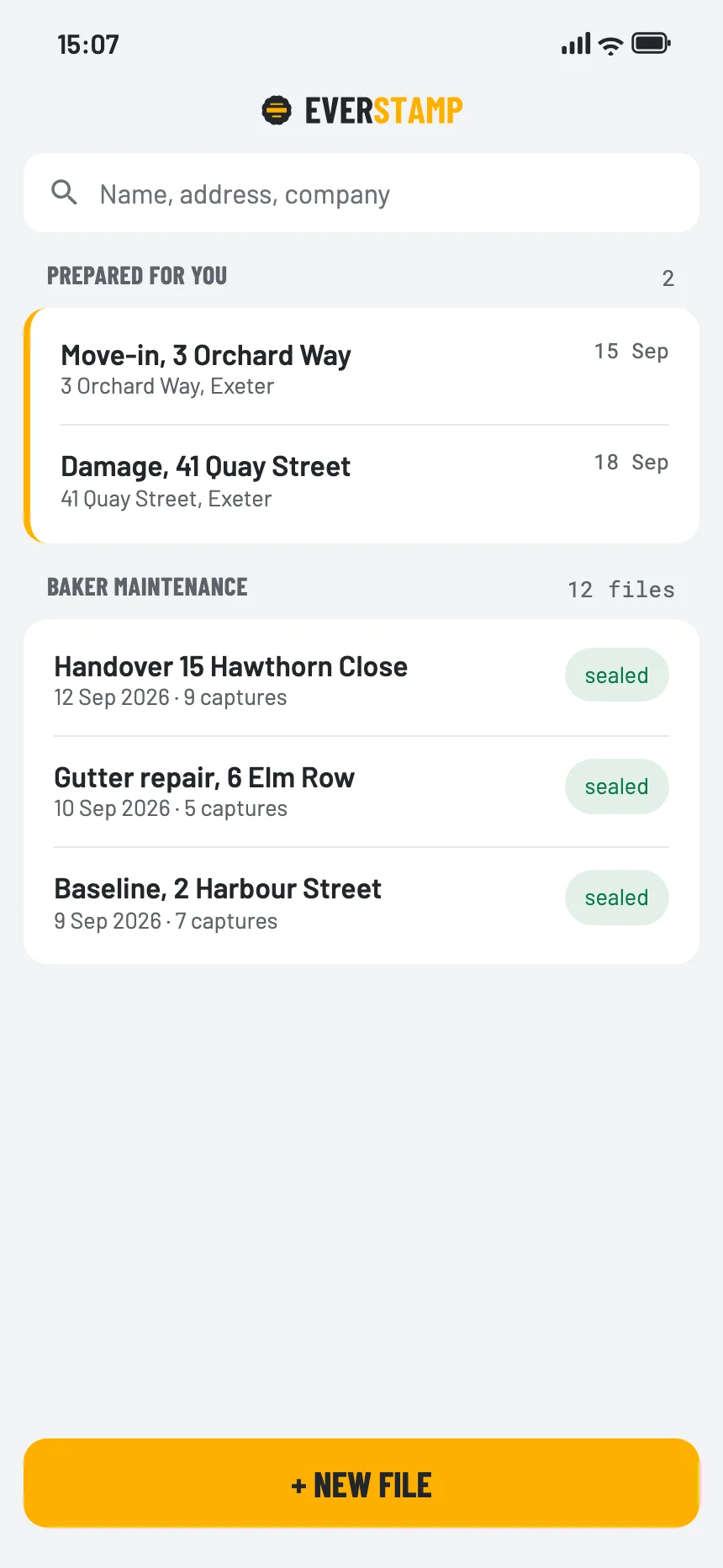
An order carries an address, a checklist and a person. It appears on their phone under “Prepared for you”, and you watch it move from prepared to picked up to registered.

Orders and projectsPlan the work per address and per person, and see where everything stands.
Your own checklistsSteps, fields and required photos, the same for everyone in the team.
RequestsAsk a customer for photos with a link or a QR code. They need no account.
People and devicesWho is in the team, in which role, on which registered phone.
Webhooks, API and exportFiles land in your own system, and everything exports as JSON or CSV.
Storage, if you want itIncluded with Business: files kept at EverStamp, encrypted, for as long as the subscription runs.
The EverStamp dashboard with open orders and their status
The app’s file list, with the orders prepared for this person at the top
The full comparison

Where the plans differ

What every plan includes, the free one too, is in the first block. The table below shows only what you get on top: working with a client, with a team and at scale.

In every plan, the free one too

Making the file

  • The stamp bar drawn into the image
  • Signed on the device, iPhone and Android
  • Checklists with a minimum per step
  • Fields: number plate, meter reading, serial number
  • Text recognition proposes the value, you confirm it
  • Works with no signal
  • Strike-through with the reason kept visible

Handing it over

  • Qualified timestamp when the file closes
  • PDF report with the file number and a QR code
  • The full archive at full resolution
  • The evidence extract, for one capture out of many
  • Entry in the public log
  • The recipient checks it in the browser
  • Photos stay on your device
BasisPlusBusinessEnterprise
What it costs
Price per month€0€9.99 incl. VATfrom €49 excl. VATon request
Price per year€0€89.99 incl. VATless than monthly, excl. VATby agreement
Files per month15by bundle, in the dashboardby agreement
Extra files€4.99 for five, incl. VATat your bundle’s priceby agreement
Users11by bundleby agreement
Extra useryes, per monthby agreement
Paymentin the appin the appin the dashboard: iDEAL or card, then automatic direct debitby agreement
For working with customers
Customer signature, in a checklist with a signature step✓✓✓
Backup to your own cloud✓✓✓
Your logo on the report✓✓✓
Share link with a password✓✓✓
Share link valid for up to7 days90 days365 days365 days
For a company
Dashboard: orders, members, status per file✓✓
Templates of your own, with your own fields✓✓
Requests to people without an account✓✓
Search by number plate or meter reading✓✓
Webhooks and an API✓✓
Your own styling of the stamp bar✓✓
Export everything as JSON and CSV✓✓
Files kept at EverStamp, included✓✓
A qualified timestamp per photoin preparationincluded, by agreement
For receiving files at scale
Delivery into your own system✓
Volume, retention and archiving by agreement✓
Data processing agreement (through annex 1 of the terms)✓✓
Signed data processing agreement and DPIA material✓
A named contact✓
The one difference worth understanding

One stamp per file, or one per photo

This is the only place where the plans differ in what they establish. The qualified timestamp per photo comes with Enterprise, by agreement; for Business it is in preparation.

In every plan
  • One qualified timestamp, applied when the file closes. Everything in the file is covered by it, and the window runs from the last anchor to that stamp.
  • The window is as wide as the file was open. Shoot for twenty minutes and the window is twenty minutes. That number is printed in the file, so nobody has to guess.
With Enterprise, and in preparation for Business
  • A qualified timestamp per photo, as soon as there is a connection. The window around each capture is then usually under a minute.
  • Included with Enterprise, by agreement. For the Business bundles it is in preparation.
  • Useful when you receive files from others at scale. A narrow window is worth paying for when a disagreement turns on the order of two captures.

What no plan does is fix the exact moment of capture. The device clock is a stated value in every plan, and what is fixed is the window it fell inside. How it works sets out what that does and does not establish, and the verification page shows it on a real file.